
On this page
Introduction
This guide explains how to run an OMOC Oracle node on a Linux server using Docker.
The goal is to provide a simple and reproducible setup process for operators who want to participate in the Money On Chain oracle network without requiring deep infrastructure knowledge.
The OMOC node:
- connects to the Money On Chain oracle protocol
- listens to configured coin pairs
- participates in oracle rounds
- publishes prices on-chain when selected by consensus
The service runs entirely in Docker and can be deployed on any VPS provider that supports Linux and SSH access.
Examples in this guide use:
- Ubuntu Server
- Docker
- DigitalOcean
However, any equivalent provider or infrastructure can be used.
Before You Start
Running an OMOC node does not require advanced infrastructure expertise, but you should be comfortable working with a Linux server through SSH and executing commands from a terminal.
Requirements
Before continuing, make sure you have:
- A Linux server with a public static IP address
- A stable internet connection
- At least 1 GB of RAM
- Docker installed and running
- A Rootstock-compatible wallet
- RBTC for transaction fees
- At least
250,000 MOCstaked in the OMOC protocol
You will also need cast installed locally to generate and manage the wallet credentials required by the oracle.
Recommended Server Setup
OMOC can run on any Linux server capable of running Docker.
For most operators, a server with 1 vCPU, 1 GB of RAM, and a public static IPv4 address is sufficient. Ubuntu 22.04 LTS is recommended, although other modern Linux distributions should work as well.
You may use any cloud provider or VPS service, including DigitalOcean, Hetzner, AWS, Vultr, or similar platforms.
This guide assumes you already have access to a Linux server and focuses on configuring and operating the oracle itself rather than provider-specific infrastructure. AWS-specific deployment instructions are available separately for operators who need them.
Install Docker
Install Docker on your server.
Ubuntu example:
sudo apt update
sudo apt install -y docker.io
sudo systemctl enable docker
sudo systemctl start docker
Validate the installation:
docker --versionExpected result:
Docker version xx.x.xGenerate Your Oracle Wallet
The oracle node requires a Rootstock-compatible wallet private key.
Generate a new wallet using cast:
cast wallet new | awk '/Address:/ {print "ADDRESS="$2} /Private key:/ {print "PRIVATE_KEY="$3}' > rootstock-wallet.env && chmod 600 rootstock-wallet.env && cat rootstock-wallet.envThis command generates a new Rootstock-compatible wallet and saves its address and private key in a local environment file.
Keep this file secure. The private key gives full control over the wallet used by your oracle.
Example output:
ADDRESS=0x...
PRIVATE_KEY=0x...
Important: Keep this file secure and never share the private key. Anyone with access to it can control the wallet used by your oracle.
Fund Your Oracle Wallet
Your oracle wallet needs RBTC to pay transaction fees when publishing prices on-chain.
Before continuing, fund the wallet you generated in the previous step with enough RBTC to support several weeks of operation. RBTC can be obtained through exchanges, bridges, or services such as Boltz.
Running out of RBTC will not disconnect your oracle from the network. It will continue participating in consensus and contributing to the protocol’s security. However, it will no longer be able to publish transactions when selected, which means it will stop receiving rewards until the wallet is funded again.
Choose Your Coin Pairs
OMOC oracles participate in the protocol by subscribing to one or more coin pairs. Each subscription allows the oracle to take part in the rounds associated with that market and contribute price data to the network.
Currently supported coin pairs include BTC/USD, RIF/USD, USD/ARS, and USD/COP.
Unless you have a specific operational reason to limit your participation, it is generally recommended to subscribe to all available coin pairs. This maximizes your oracle’s participation in the network and simplifies ongoing operations.
Configure the Oracle
The node can be fully configured using environment variables.
For OMoC mainnet operation, use the Rootstock RPC service. Create an account, sign in to the dashboard, and select New API key. Choose Mainnet, create the key, and copy the full RPC URL provided by the service. See the official setup guide for details.
Replace YOUR_API_KEY in the examples below with your own API key. Keep your key private and do not publish the completed environment file.
Create an environment file:
nano env_oracleExample configuration:
NODE_URL=https://rpc.rootstock.io/YOUR_API_KEY
NETWORK_ID=30

ORACLE_ADDR=0x...
ORACLE_PRIVATE_KEY=0x...

ORACLE_PORT=5556

REGISTRY_ADDR=0x...

COIN_PAIR_LIST=BTCUSD,RIFUSD,USDARS,USDCOP
Environment Variables
NODE_URL
Rootstock mainnet RPC endpoint from the Rootstock RPC service, including your API key.
Example:
NODE_URL=https://rpc.rootstock.io/YOUR_API_KEYNETWORK_ID
Rootstock network identifier.
Mainnet:
NETWORK_ID=30Testnet:
NETWORK_ID=31Mainnet is recommended for production operators.
ORACLE_ADDR
The public address of your oracle wallet.
ORACLE_PRIVATE_KEY
Private key associated with the oracle address.
REGISTRY_ADDR
Oracle registry contract address.
COIN_PAIR_LIST
Comma-separated list of subscribed coin pairs.
Example:
COIN_PAIR_LIST=BTCUSD,RIFUSDRun the Oracle Node
Start the container:
docker run -d \
  --restart always \
  --name omoc-node \
  --publish 5556:5556 \
  --env-file ./omoc.env \
  --log-driver json-file \
  --log-opt max-size=50M \
  --log-opt max-file=15 \
  --log-opt compress=true \
  moneyonchain/omoc_node:latest
Validate the Node Is Running
Check container status:
docker psYou should see:
omoc-nodeCheck Logs
You can monitor your oracle’s activity by inspecting the container logs:
docker logs -f omoc-nodeAfter the node starts, you should see messages indicating a successful startup, a connection to the Rootstock network, and activity related to the coin pairs configured for the oracle. As the node begins participating in the protocol, the logs should also show round-related activity.
If the node is unable to connect or does not appear to be operating correctly, start by verifying that the RPC endpoint configured in NODE_URL is reachable. You should also confirm that any firewall rules allow the required network traffic and that Docker networking is functioning correctly on the host machine.
Register Your Oracle
Once the node is running correctly:
Open the Money On Chain Oracle dApp:
Connect your wallet
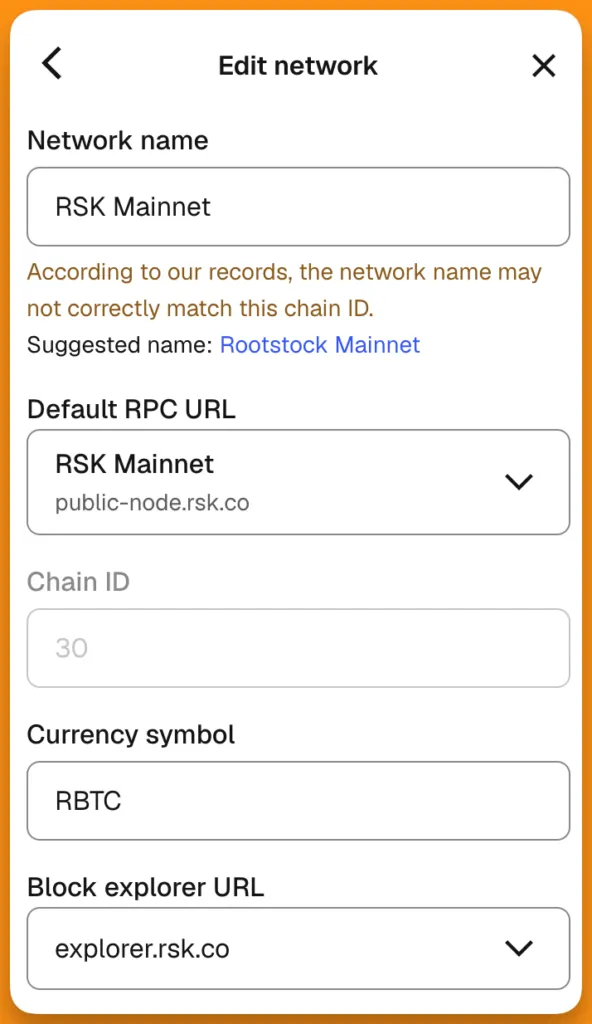
Metamask Custom Network configuration for Rootstock
Stake the required MOC
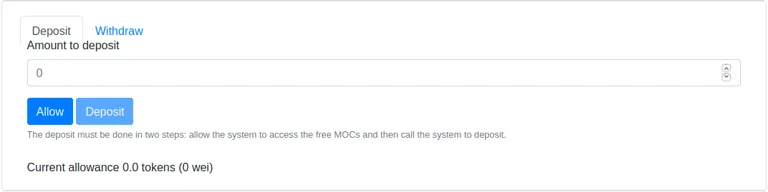
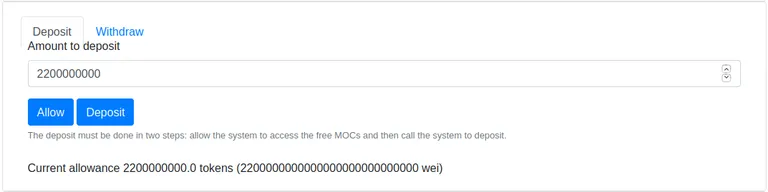
To be able to subscribe your Oracle to coin pairs and participate in the rounds, you need to deposit a minimum amount of stake in the system. In order to do that, first you will need to have tokens or get them from the MoC foundation. Then go to the Staking page -> Deposit tab and allow the system to access your MoCToken. After that you can make the Deposit of the tokens.
Register your oracle address and public endpoint
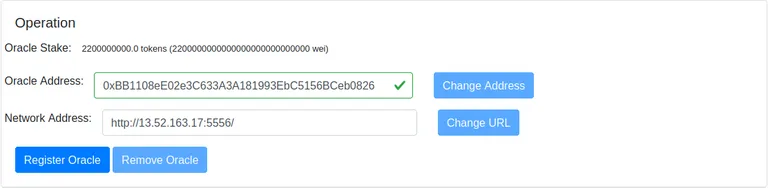
To register your Oracle, you need to go to the Oracles tab -> Operation section. Then, you will have to enter the Oracle address and the network address. In the same section, you will be able to change the Oracle address, change the network address and remove the Oracle.
Subscribe to coin pairs
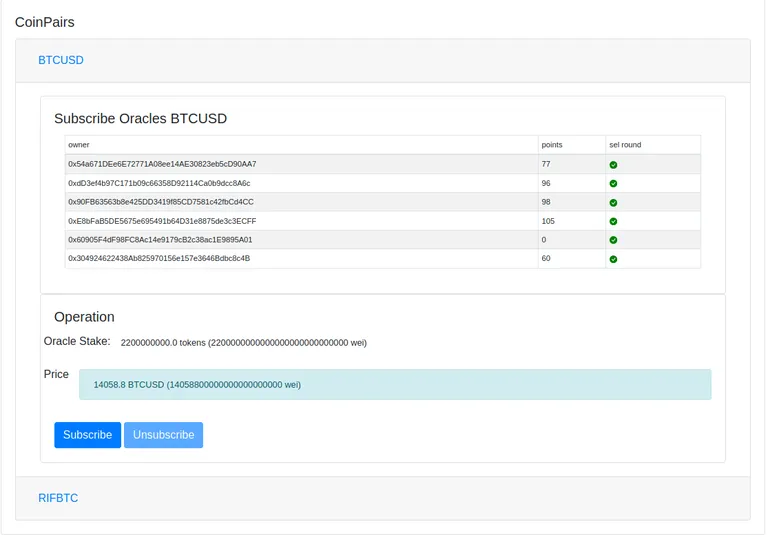
In order for your Oracle to participate in the coin pairs’ rounds, you will need to subscribe to each coin pair. In the CoinPairs section, you will have to open the coin pair of your choice and click Subscribe.
At this stage:
- your oracle may need to wait for the next
switchRound - depending on current oracle participation limits
Validate Registration
Once registration is complete, take a few minutes to confirm that everything is working as expected.
Start by checking the Oracle dApp and verify that your oracle appears in the list of registered operators. You should also confirm that the coin pairs you subscribed to are displayed correctly.
Next, review the node logs:
docker logs -f omoc-nodeWhat’s Next?
At this point, your oracle should be fully configured and participating in the network.