
On this page
Update your Oracle
Keeping your oracle updated ensures compatibility with the latest protocol changes, security improvements, and supported coin pairs.
Quick Update (Recommended)
The easiest way to update your oracle is to run the update script from the directory where your env_oracle file is located. By default, this is usually your home directory.
curl -L /omoc_update.sh | bashThis script performs the complete update procedure automatically and is the recommended approach for most operators.
Manual Update
If you prefer to perform the update yourself, follow the steps below on the server where your oracle node is running.
First, pull the latest oracle image:
docker pull moneyonchain/omoc_node:latestStop the currently running container:
docker stop omoc-nodeRemove the old container:
docker rm omoc-nodeStart a new container using the updated image:
docker run -d \ --restart always \ --log-driver json-file \ --log-opt max-size=50M \ --log-opt max-file=15 \ --log-opt compress=true \ -p 5556:5556 \ --name omoc-node \ --env-file=/home/ubuntu/env_oracle \ moneyonchain/omoc_node:latestAdjust the –env-file path if your env_oracle file is stored elsewhere.
After the container starts, verify that the oracle is operating normally by reviewing its logs:
docker logs -f omoc-nodeYou should see the node connecting to the network, subscribing to coin pairs, and participating in rounds. Press Ctrl+C when you are finished viewing the logs.
Checking the Running Version
Oracle nodes expose a version endpoint that reports the currently running release.
To check the version locally on the server, run:
curl http://localhost:5556/versionExample response:
{ "version": "1.3.7.0" }You can also access this endpoint remotely using your server’s public IP address:
http://:5556/versionThe /version endpoint is available in oracle releases starting from version 1.3.6.3. Earlier versions do not support this endpoint.
Recent Releases – Changelog
1.3.7.5Safeguard Against Stuck TasksLatest
This release adds a safeguard for potentially stuck tasks, removes obsolete automatic round schedulers, fixes the debug information endpoint, and updates price source dependency to v0.7.9.
1.3.7.4RIF/USD Conditional Publishing
Introduces improvements to RIF/USD conditional publishing, including:
- Adjusted the default RIF/USD fallback cadence to give selected oracles more time to publish.
- Reduced unnecessary fallback publications.
1.3.7.3Signature Validation and RIF/USD Defaults
Introduces fixes and maintenance improvements, including:
- Improved signature validation to align with the smart contract.
- Updated RIFUSD conditional publishing defaults.
1.3.7.2Price Publishing Improvements
Introduces improvements to the price publishing mechanism, including:
- Prepared for the future implementation of
TasksRunnerMIP#263102 - Improved conditional publishing.
1.3.7.0Publication Cost Optimization
Introduces cost-saving improvements for price publications, including:
- Dynamic minimum gas price limits
- Publication parameters that adapt to stablecoin protocol conditions
1.3.6.9USD/ARS and USD/COP Support
Adds official support for: USD/ARS and USD/COP
1.3.6.8Coin Pair Round Gas Price Fix
Security-related fixes:
- Coin pair switch round gas price fix
1.3.6.7Gas Limit and FastAPI Security
Security-related fixes:
- Coin pair switch round gas limit fix
FastAPIdenial-of-service mitigation
1.3.6.6Gas Price and RIF Price Sources
Gas price and RIF price source improvements:
- Adds hard limits to the
gas price - Local contract
ABIcopies - Additional
gas pricelogging RIFprice source fixes
1.3.6.5Gas Price Spike Fix
Fixes gas price spikes caused by incorrect 20 Gwei announcements from RSK network nodes.
1.3.6.4Documentation and Dependencies
Documentation and dependency cleanup:
- Readme improvements
- Removal of unnecessary dependencies
1.3.6.3Operational Endpoints
Adds operational endpoints:
/versionreturns the running oracle version/infoprovides additional node status information
1.3.6.2Signing Request Error Reporting
Improves error reporting when a signing request is rejected, making it easier to identify publication conditions that are not being met.
1.3.6.1Contract Version Compatibility
Improves compatibility across contract versions by allowing the oracle node to use either the oracle address or the owner address when interacting with protocol contracts.
Remove Your Oracle
Before removing an oracle from the protocol, it must first unsubscribe from all coin pairs. This ensures the oracle is no longer assigned to participate in price publication rounds.
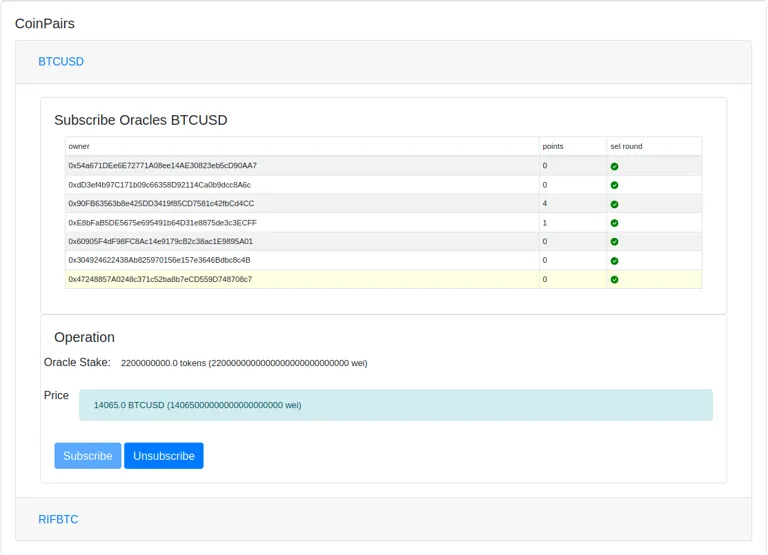
Go to the Oracles page in the dApp and scroll to the Coin Pairs section. Unsubscribe from each coin pair until none remain assigned to your oracle.
Once all coin pair subscriptions have been removed, navigate to the Operation section and select Remove Oracle.
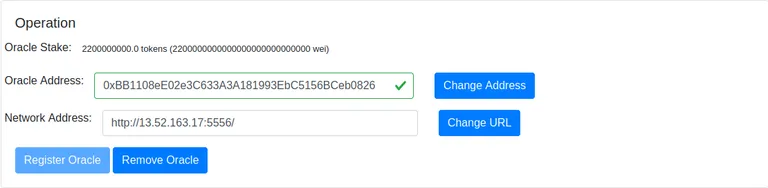
After the transaction is confirmed, your oracle will be removed from the protocol and will no longer participate in oracle operations.
Troubleshooting
This section covers common issues that can prevent an oracle node from starting correctly or participating in rounds.
Check the Oracle Logs
Start by checking the container logs. Most configuration or connectivity problems will appear there first.
docker logs -f omoc-nodeIf you only want to inspect the most recent log entries, run:
docker logs --tail 100 omoc-nodeRPC Node Connection Issues
Your oracle needs access to a Rootstock RPC node to read protocol contracts and submit transactions. If the RPC node is unreachable, the oracle will not be able to read the contract registry or retrieve coin pair information.
A connection problem may appear in the logs as timeout errors similar to this:
WARNING: Error getting param from blockchain 'ORACLE_MANAGER_ADDR'
ERROR: Oracle loop Error getting coin pairs
ERROR: SchedulerSupportersLoop error getting is_ready_to_distribute
This usually means that the RPC URL configured in your environment file is not reachable from the server running the oracle.
To test RPC connectivity from your server, run:
RPC_URL="<ROOTSTOCK_RPC_URL>"

curl -s -X POST \
  -H "Content-Type: application/json" \
  -d '{"jsonrpc":"2.0","method":"eth_blockNumber","params":[],"id":123}' \
  "$RPC_URL"
If the RPC node is reachable, it should return a JSON response with a result field containing the latest block number in hexadecimal format.
Example response:
{ "jsonrpc": "2.0", "id": 123, "result": "0x6f8d3a" }If there is no response, or the request times out, check that the RPC URL is correct and that your server can reach it over the network. Also verify that no firewall rule, cloud security group, or RPC provider restriction is blocking the connection.
For a more readable block number, you can use jq:
RPC_URL="<ROOTSTOCK_RPC_URL>"

curl -s -X POST \
  -H "Content-Type: application/json" \
  -d '{"jsonrpc":"2.0","method":"eth_blockNumber","params":[],"id":123}' \
  "$RPC_URL" \
  | jq -r '.result' \
  | xargs printf "%d\n"
This command requires jq to be installed on the server.
Oracle Port Not Reachable
Your oracle must be reachable from the internet on its configured port. By default, the oracle listens on port 5556.
From an external machine, test the connection with:
curl http://`<YOUR_SERVER_IP>`:5556A response like the following means the port is open and the oracle service is responding:
The request was not made by a selected oracle.This message is expected. It means the oracle received the request but rejected it because it did not come from an authorized protocol caller.
If the request times out or the connection is refused, check that the Docker container is running and that the port is published correctly:
docker psYou should see a port mapping similar to:
0.0.0.0:5556->5556/tcpIf the container is running but the port is still unreachable, verify your server firewall and any cloud firewall or security group rules. The oracle port must allow inbound TCP traffic from the internet.